
[Ask BB] Saving Brushes, Object-Expand, Raster Effects Settings and more

This page may contain links from our sponsors. Here’s how we make money.
This is my first Question/Answer post here at BittBox, and I plan on doing this more often. All of these questions came in from twitter, so if you have a Photoshop or Illy question you need answered, you can leave a comment here, or send me a tweet. I'll save all the questions that come in and try to answer as many as I can. To kick things off I have some answers below, just remember, I can't answer every single question that comes in because of 2 fundamental reasons: 1) I may not know the answer, or 2) I may not understand what you were asking. Ok, lets try to de-mystify Illy and PS a little, shall we? Thanks for everyone who send in the tweets 🙂
![[Ask BB] Masking, Object-Expand, Antialiasing and more](https://www.bittbox.com/wp-content/uploads/2009/02/ask.jpg "[Ask BB] Masking, Object-Expand, Antialiasing and more")
1) SuperLame Asks:
Any good plugins for AI to make choosing fonts more visual, like flash?
Answer:
As far as plugins go, I haven't been able to find one that does what you want, however, there is one Illustartor quirk to ba aware of. If you choose your fonts from the top toolbar you'll get a plain list of fonts. But if you choose fonts from the Character palette itself, you get a small visual preview, similar to the way Flash works. And if you have an extra $100, this software might be what you need.

VS.
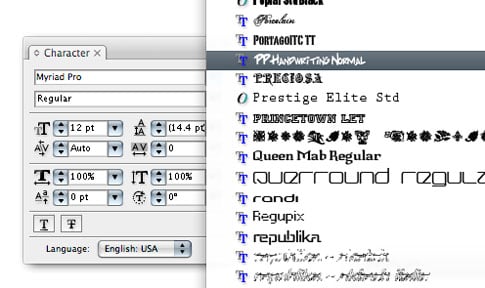
2) deluzione asks:
How do I convert and illy doc from 72dpi to 300?
Answer:
Good question. This is one of those settings that you would think you should be able to find under “Document Setup,” since it's a setting you choose every time you create a “new” document. However, our friends at Adobe thought it should be in a different place. You'll find the “Document Raster Effects Settings” under the “Effects” menu.

Just change your setting to 300dpi, and click OK.

3) GrandmasterB asks:
I've tried to use Object > Expand… to make a uniform space around text after creating outline, but it doesn't seem to work…why?
Answer:
Your on the right track, but that's not what “Expand” was meant for. The command your looking for is “Offset Path.” We can achieve the results you want in 3 easy steps:
Step 1. Type > Create Outlines.

Step 2. Go to Object > Path > Offset Path.

Step 3. Check the preview box and enter a value for the amount you want to offset. (use a negative number to offset inside instead of outside).

4) katzw asks:
What is the correct way to save custom brushes so that others can download and use them? EPS files don't seem to work. Thanks 🙂
Answer:
I assume you mean Illustrator brushes, so I'll try and answer this as best I can. When you save Illustrator brushes, illustrator outputs an .AI file. It's not a normal AI file, but a “Brush Library.” All you have to do is place that AI file into …Illustrator CSX > Presets > Brushes, and you'll be able to load the brushes via the Brushes Palette.

Hope that helps, guys:) Remember, you can send me questions via twitter whenever you want. The more questions, the better!
