How to: Make a Hand-Drawn Font

Before I start, let me say that this is by no means the only way to make a hand drawn font. Ever since I began giving away fonts, I’ve had many requests for me to write a tutorial on my font making process, so here it is. This is how I do it, and depending on your responses, I can go deeper into a FontLab Studio tutorial. This tutorial, however, is designed to reveal my process from start to finish. A lot of you may not have FontLab Studio, so you may need to adapt the second half of the tutorial to whatever font software you may have access to. Here we go.

How to: Make a Hand-Drawn Font

1. The Tools

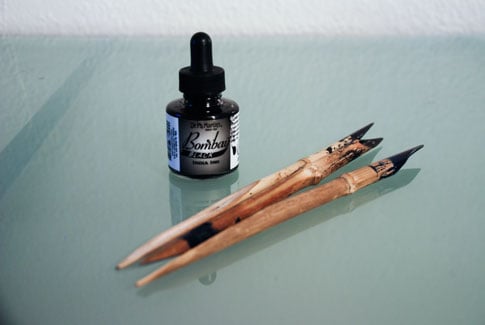
I like to use India Ink and a primitive Bamboo Pens (above) to draw my characters, but you can even just use a pencil and paper if you like. You can get both the items pictured above really cheap (< $10 total) from your local art supply store or Hobby Lobby, etc.

2. Start Drawing

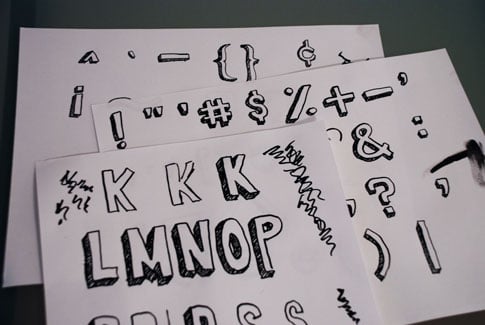
Take whatever tools you choose to use and start cranking out letter forms. It’s ok to mess up, just draw the letter again. But keep cranking them out until you’re happy with what you’ve got. I like to lay all of the finished ones out in front of me so I can see what I already have and what I still need. The squiggly lines are just where I got rid of some excess ink from the tip of the bamboo pen before sketching.
How to: Make a Hand-Drawn Font

3. Scan

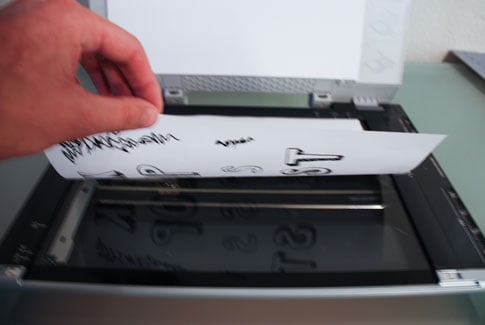
Next, I scan the images in at a relatively high resolution.
How to: Make a Hand-Drawn Font

4. Bump up the Contrast

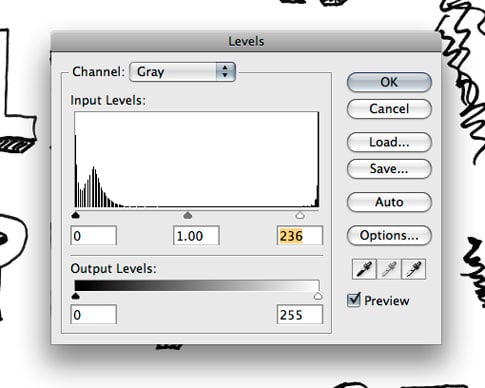
In order to get a better final result, I adjust the contrast of the scan. I typically convert my image to grayscale, then use Levels (Control/Command + L) to make the whites whiter and the blacks blacker. Then save as a high-res jpeg.
How to: Make a Hand-Drawn Font

5. Open the Scans in Illustrator

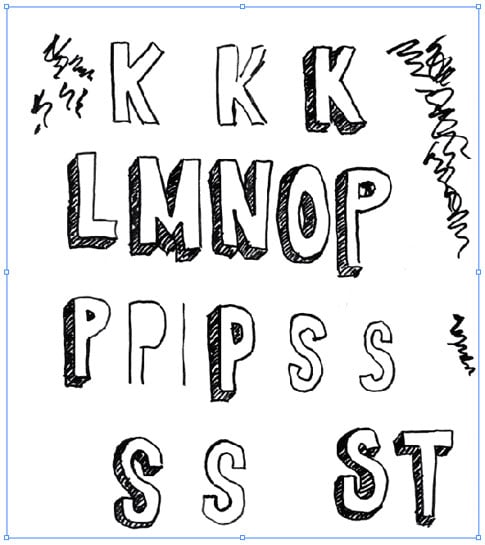
I use an “outline font editor” (FontLab Studio) which is another way to say that the final product needs to be a vector. I use Illustrator’s Live Trace to vectorize the shapes. So next, I open the jpeg scans in Illustrator.
How to: Make a Hand-Drawn Font

6. Live Trace

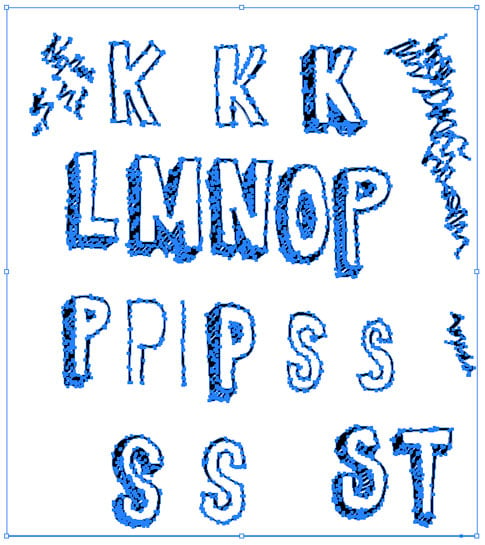
Vectorize your image using Live Trace to get the results your happy with, then hit “Expand.” So now you have something like below.
How to: Make a Hand-Drawn Font

7. Ungroup

After you Live Trace, ungroup the objects.

How to: Make a Hand-Drawn Font

8. Get Rid of the White Shapes

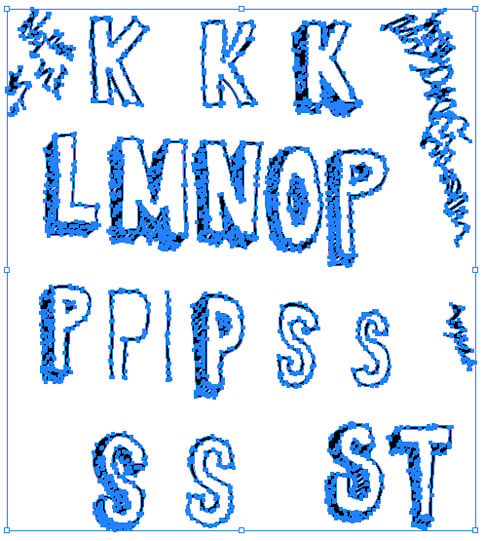
After ungrouping I use the Magic Wand tool, and click on any of the white space in and around the letters. This selects all of the white shapes at the same time, and then I delete them.

How to: Make a Hand-Drawn Font

So now all that remains is the black shapes. Notice the bounding box. There is no more whitespace around the edges compared to just after live trace above.
How to: Make a Hand-Drawn Font

9. Prepare the Font Editor

It’s now time to fire up the font editor of your choice. I use FontLab Studio ($649) but it’s not the only one. TypeTool is a $99 Font Editor from the same people who make FontLab Studio. If you’re not looking for anything fancy, that’s the one I recommend (Windows, Mac), and it’s affordable compared to other products on the market. FontForge is a freeware font editor, but I believe it’s Windows only.

Depending on which editor you plan on using, the next part might be a little different than your software, but you can get the general idea, and adjust accordingly. If you use TypeTool, it should be very similar, since the software I use is from the same company.

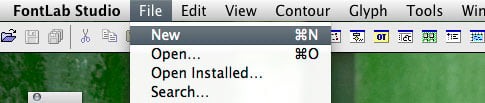
Create a new blank font file.
How to: Make a Hand-Drawn Font

Go to File > Font Info.

How to: Make a Hand-Drawn Font

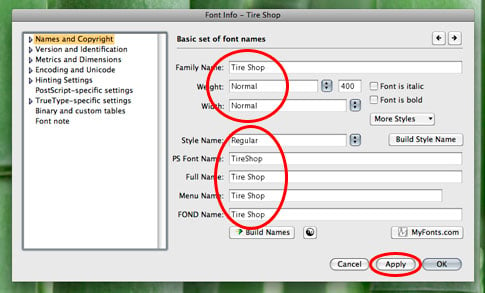
Fill out the information that describes your font. Family Name, Weight, Bold or not, etc. This information is important and will be embedded in the file in it’s final form.

How to: Make a Hand-Drawn Font

10. Copy/Paste

Start copying/pasting your characters (paths) one-by-one from Illustrator into their corresponding slots in your font editor.

How to: Make a Hand-Drawn Font

11. Adjust

Adjust Each character’s paths to your liking in the font editor. You can always go back and make adjustments if you don’t get it right the first time. And again, I can’t go too deep into this if you aren’t using FontLab Studio, but I’m sure you can find some info in your software’s help section, or google :)

How to: Make a Hand-Drawn Font

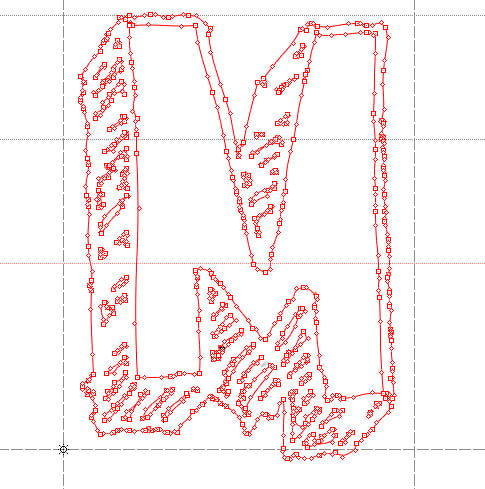
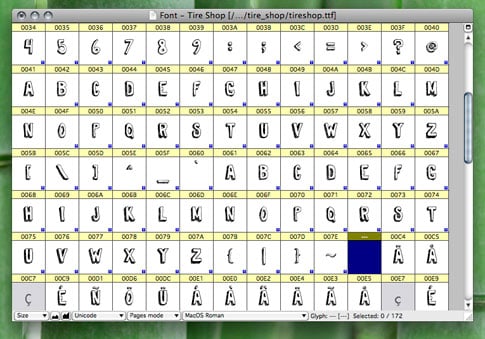
Here’s a peek at what one of my completed fonts looks like in the font editor.
How to: Make a Hand-Drawn Font

12. Generate Your Font

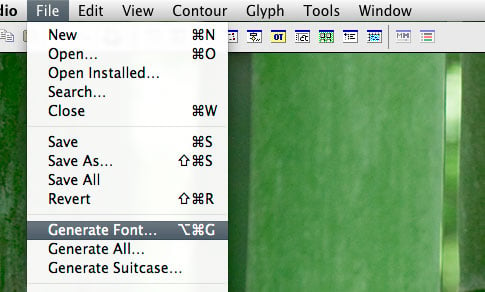
Go to File > Generate Font….

How to: Make a Hand-Drawn Font

Choose your format (.ttf will work fine for both Mac and PC) and Save!

How to: Make a Hand-Drawn Font

Done!

Like I said, this isn’t the only way to do this, it’s just the way I happen to do it. You can draw your letters with the pencil tool directly in Illustrator if you feel like it. There are many different ways, I just wanted to share my process with everyone, since you’ve been wondering. I hope you enjoyed the tutorial :)

This entry was posted on Monday, November 10th, 2008 at 4:25 pm and is filed under Fonts. You can follow any responses to this entry through the RSS 2.0 feed. You can leave a response, or trackback from your own site.
Stumble It
Add to Del.icio.us

133 Responses to “How to: Make a Hand-Drawn Font”

  1. Alright! Thanks Jay! I’ve always been interested in designing my own fonts but never actually tackled it as I thought it was too complicated. Nice post.

  2. Whoooa… I think I’m going to buy a new scanner to create my first hand drawn font :D
    Looks like a fun process! thanks for posting this tutorial ;)

  3. Thanks for sharing your process in this perfect tutorial. I would love for you to make a FontLab tutorial and go even further into the font making process. Very cool!

  4. Thanks Jay, great timing!
    I’ve a few unused letterforms that I designed a while ago for a logo, and I’ve been meaning to expand them into a font set, but wondered about which programs to look into. It’s just for fun, so I’m going to try out the free FontForge.

  5. great tutorial. just like josaih, i thought that making fonts was way too complicated. now… to find the time to get creative…

    thanks.

  6. Nice job Jay, an interesting read,
    thanks for sharing

  7. Wow very nice post
    I like your hand made font
    thanks for sharing

  8. Wonderful tutorial, it’s great to see your process from start to finish. Thanks!

  9. Cool stuff. I have been too lazy to bring it all over to Fontlab. Haha.

  10. Chris Reardon

    What do you recommend for a scanner.

  11. nice tutorial!..tnaks Bitt!
    Mau

  12. i think you can skip step 8 by making sure the “ignore white” box is checked in the Live Trace options palette when you are fine tuning your trace. It also helps because sometimes when you delete the white shapes manually, they are actually on top of black shapes and you will end up getting too much black in your image… Anyway, it helped me when i found it… I love this blog, btw…

  13. FontForge also runs on Mac OS X, but only with supreme fugliness under X11.

  14. wow. that was simpler than i expected. maybe doing a more professional style as opposed to hand drawn is more laborious. id be interested in a write up about the design process behind a font. that seems to be where all the work is ;) thanks jay. keep ‘em comin’.
    -Zach

  15. [...] awesome tutorial from BittBox. Here is the link to the tutorial: Hand drawn font tutorial from BittBox This tutorial uses Adobe Illustrator and mainly Fontlab Studio, but other font programs can be used [...]

  16. Suh-weet! I’ve been waiting for this tutorial for a long time, thank you so much! Might have to put some of this font software on my Christmas list. :)

  17. Great tutorial Jay! I would also echo Geoffrey’s comments. The ignore white checkbox in the live trace dialog box is very helpful although I’ve found that when live tracing an object that sometimes it leaves in shades of gray along the edges. So sometimes it helps to draw in a black background just to see how the vectors look against a background that’s not white then delete any gray spots along the edges.

  18. You can also skip the scanning part and work directly in Illustrator if you have a tablet handy; that’s what I do and it works just fine. Great tutorial!

  19. Exactly what I was looking for. Wow, thanks!

  20. Nice tutorial. I find live trace though really hard to use for those who want to simply clean vectors. Lots of extraneous points, but I suppose doesn’t matter if put into fonts. Love the font, sketch style is so in.

  21. woo hoo your gay

  22. Excellent tutorial. To eliminate the boring Copy/Paste process I prefer to create an initial font through http://www.yourfonts.com/
    Then I open it in my font editor and make final changes to character outlines.

  23. ..yea, nice tutorial! you should eventually mention kerning adjustements before exporting the font..

  24. Great tutorial, content and site. Thanks for your contribution to the design community!

  25. This is great stuff – it always takes me ages to draw and scan in the slow, idiotic way i’ve been doing it. Thanks for the lesson in how to do it properly!

  26. Wow what a great tutorial! Great work!

  27. Very nice tutorial! The screenshots and photos are particularly instructive.

  28. It’s good to see different approaches to accomplish some task, like this one. Thanks.

  29. Very nice! Thanks for the tutorial!

  30. Very useful! Many thanks.

  31. Its really interesting, i thought that making fonts was way too complicated

  32. Finally. I was wondering when you were going to get around to making a tutorial like this.

    One question…I think there is a check box you can click in the Live Trace step which automatically ignores white space, thus saving you the magic wand step…is this true?

  33. That’s pretty neat. Can we design a really nice font and sell it?

  34. one thing to note too, you can’t scale the glyph in FontLab or else it will look a little different from your illustrator version.

    :)

  35. Great tutorial. I was actually inspired by your first free hand-drawn font a few months back and ended up doing my own. Surprisingly my process was nearly exactly the same. I used a sponge brush for mine and a slightly different way to get rid of the white in Illustrator. The magic wand way might be more efficient though, since I ended up with a few minor issues during my copy/paste to FontLab. Check out my free font here: http://jonsperry.blogspot.com/2008/10/free-font-sewer-rat.html

  36. Very cool! This is the first time I’ve seen a tutorial like this one. This is very useful information!

  37. Hey Jay, please make a tutorial on kerning etc. for Fontlab. That would be AWESOME!

  38. DUH.

    bithday.

    tequila.

    MB is a fucking leg END.

    i love her as much as Eminem loves lyrically waxing bitCh ass hoes.
    homie.

    CH!

    graphic design is crap.
    i should be in class but instead im in bed with MB drinking tequila…you should heed me and do the same

    x

    p.s.
    good time not a long time

  39. [...] ??? ??? ? ???? ????? ????????????? ???????? “??? ??????? ?????????? ?? ???? ?????” ? ???? ???????? (Jay Hilgert) ?? ??? ????? [...]

  40. what’s that beautiful wallpaper? :D

  41. A more in-depth FontLab tutorial would be incredible. Next semester I’m doing a type design project for an independent study project.

    @ Zach: A more “classic” typeface design can take a year or more easily, depending on the number of weights. And that can be with interpolation tools that make drawing the heavier and lighter weights easier.

  42. Fontforge isn’t freeware, it’s open source. It runs on Linux, Mac OS and Windows.

  43. Great tutorial BittBox. Just got inspired to give this a try and make my own. Thanks for the tutorial.

  44. great post!!!

  45. lol, instead of paying 645 dollars for that font designer, i would just download it from a torrent website. but hey, thats just me trying to not spend too much money.

    Great topic though and pcs rule.

  46. I can’t believe nobody in this post’s comments has mentioned Scanfont (http://www.fontlab.com/font-converter/scanfont/) which takes all the hard work out of making a handwriting font. It’s so simple:

    - Draw font
    - Scan font
    - Put into Scanfont (which splits up the letters and auto-assigns them to their alphabet positions)
    - Make final adjustments
    - DONE

    Sounds a bit easier, yes?

  47. thanks all admin very good sites tesekkur ederim hersey cok guzel saolun varolun

  48. veryy good sites thak all admin it very nice good very good sites

  49. thank you admin very good. it n?ce to miet se you later cok guzel tsk ederm

  50. wow I always thought that creating hand drawn font is harder than this. Thanks for the tutorial :D

  51. I just need to scrape together some cash from under the sofa to buy FontLab Studio, I guess.

  52. aa no mui mall estoo todo emm imgles

    asi no va loko XD

    na todo bn pero tipo ke metan algo em español XD

  53. Fontforge is actually linux software. To make it run on windows you need cygwin. I’m using it in linux.
    I have illustrator on windows, I don’t think Wine can do Illustrator.

  54. [...] How to Make a Hand Drawn Font [...]

  55. [...] Bittbox [...]

  56. Linking your tutorial on http://www.amenidadesdodesign.com.br where everybody can find inspiration for design projects…

  57. very good sites thank you

  58. Men! this is BIG BIG information! thanks!

  59. [...] 49. How to: Make a Hand-Drawn Font [...]

  60. great entry thanks

  61. Great tute.
    Good timing too – I had a dream last night and there was a flag being waved around with a neat font on it that I’d like to create sometime.
    .. over the last few years I have wondered occasionally about making some fonts but never really knew where to start.. you are good at laying out the steps clearly that makes it all seem so easy and self explanatory nearly.
    Thanks

  62. [...] Bittbox [...]

  63. Step-by-step: How to make fonts!

  64. I think I’ll try my hand at creating a font soon.

  65. [...] 49. How to: Make a Hand-Drawn Font [...]

  66. Hey I just wanted to thank you for making this font. I recently used it for a conference we held and we made notebooks for our students to take notes in, i used a weathered notebook paper background and i wanted the titling to look handwritten but still look semi clean. This font was PERFECT! i combined it with some hand drawn elements and other various handrawn text that i made. It went really well. I had TONS of compliments on it! THANK YOU THANK YOU THANK YOU!

  67. [...] Category: Hand Drawing, FontLearn It Now [...]

  68. [...] Bittbox [...]

  69. [...] 4. How to Make a Hand Drawn Font [...]

  70. the only problem is that $700 software :O

  71. @ Viv Singh, why don’t you use Gimp, Inkscape and Fontforge???

  72. [...] 7/  The 75 Hottest Business Card Designs You’ve Ever Seen! (ever-real.com) 8/  How to: Make a Hand-Drawn Font (bittbox.com) 9/  127 RSS Feeds That All Designers Should Subscribe To (colorburned.com) 10/ [...]

  73. [...] How to: Make a Hand-Drawn Font ? ??? ???? ????? ???????? ???? ???? ??? ???? ??? ?????????? ?? ???????? ???????? ????????. [...]

  74. [...] How to: Make a Hand-Drawn Font | BittBox – [...]

  75. lesbianraygun

    Please don’t use the live trace tool.

  76. Fontforge works in linux too.

  77. [...] How to: Make a Hand-Drawn Font [...]

  78. [...] How to: Make a Hand-Drawn Font [...]

  79. So, I’m trying to follow the tutorial but when I paste from Illustrator into FontLab, the resulting letter is INSANELY small, so much so you can’t even see it.

    What am I doing wrong? this is KILLING me here.

  80. ????????????????

  81. [...] Lassam Blockscript (the post before this one) was prepared using Illustrator CS4 and FontLab Studio. The process is illustrated here: How To Make A Hand-Drawn Font. [...]

  82. [...] How to: Make a Hand-Drawn Font Bitt Boxx had done this niche tutorial in his blog. It’s a nice step by step tutorial making the font from hand writing.  [...]

  83. [...] BitBox: How to Make a Hand Drawn Font [...]

  84. We Made You – Eminem…

    Here are the Slim Shady We Made You lyrics and new Eminem video for the rapper’s latest single. See the music video, lyrics and photos here.
    The Eminem has released both the music video and the lead single for his forthcoming sixth album, Relapse se…

  85. [...] How to: Make a Hand-Drawn Font [...]

  86. [...] How to: Make a Hand-Drawn Font | BittBoxgood little tutorial on getting your hand-drawn type into the computer. for all you hand-written script surf logotype peoples. hint hint. [...]

  87. nices article.

  88. thanks good share ;)

  89. Hey there, I was looking for something like this for a while now. Something to ‘optimize’ the letters so they don’t degrade when live tracing :). Now I realize high resolution = the bomb!

  90. ???????????

  91. Suffering from tendonitus makes it difficult to write for any length of time, so having my handwriting as a font would be invaluable to me!
    Thanks for the help!

  92. [...] How to: Make a Hand-Drawn Font [...]

  93. [...] How to: Make a Hand-Drawn Font [...]

  94. beauty web has-been

  95. beauty web has-been admin:)

  96. [...] 49. How to: Make a Hand-Drawn Font [...]

  97. 2 legged cheetah

    salinomycin salinomycin kaminey review kaminey review al smith beer photo al smith beer photo rockmelt rockmelt betty hutton betty hutton jennifer walcott jennifer walcott keith hennessey keith hennessey beverly hills ninja beverly hills ninja burn notice season 3 episode 10 burn notice season 3 episode 10 closet freak clothing line closet freak clothing line bully beat down bully beat down

  98. [...] ???????????????????? – How to Make a Hand-Drawn Font? [...]

  99. fontforge is an open source program written in C – this is neither shareware nor windows only. You can build it for any platform, but since it uses X11 windowing you would see it best in Linux. OS X works fine using macports (the “easy” way to do such things), and they claim to have a version you can build on windows in Visual Studio.
    It only takes a minute to google these things. :s

  100. just what i needed pal

  101. thans yourss

  102. i think you can skip step 8 by making sure the “ignore white” box is checked in the Live Trace options palette when you are fine tuning your trace. It also helps because sometimes when you delete the white shapes manually

  103. Thanks very much very good read that text :)

  104. I’ve had many requests for me to write a tutorial on my font making process, so here it is.

  105. Easiest way to make a font: http://www.fontcapture.com/. You can just draw your font on the provided pdf they give, or edit your font in illustrator and place on their sheet and upload. Check it out.

  106. I’ve had many requests for me to write a tutorial on my font making process, so here it is.

  107. [...] How to: Make a Hand-Drawn Font [...]

  108. thans yourss

  109. [...] How to Make a Hand Drawn Font [...]

  110. hey thanks a lot!! C:

  111. Great post, I always knew there was a good reason for having a scanner. Keep up the good work

  112. i think you can skip step 8 by making sure the “ignore white” box is checked in the Live Trace options palette when you are fine tuning your trace.

  113. [...] Les meir om korleis du gjer handskrifta di om til ei dataskrift her [...]

  114. good very nice thanks

  115. [...] How to: Make a Hand-Drawn Font [...]

  116. How to: Make a Hand-Drawn Font…

    This tutorial, however, is designed to reveal my process from start to finish. A lot of you may not have FontLab Studio, so you may need to adapt the second half of the tutorial to whatever font software you may have access to….

  117. [...] How to: Make a Hand-Drawn Font | BittBox Before I start, let me say that this is by no means the only way to make a hand drawn font. Ever since I began giving away fonts, I’ve had many requests for me to write a tutorial on my font making process, so here it is. [...]

  118. [...] – How to Make a Hand-Drawn Font? If you enjoyed this article, please consider sharing it! [...]

  119. [...] How to Make a Hand Drawn Font [...]

  120. As the drawings you make are line-art and not photos you will get a better result if you don’t save in jpg but use a lossles format like png, bmp or tif. If, in spite of that you must save as jpg because you are one of those who have never heard of other formats make sure you opt for the zero compression / 100& quality setting.

  121. Nice- simple and easy!

  122. Thank you so much! you have no clue how much this has helped me..
    Goldmine!!

  123. harika siteniz admin…

  124. Make a Hand-Drawn Font…

    Make your own handdrawn font…

  125. Thank mentioning great

  126. are you veryyy

  127. veryy Godddd Kesmee

  128. are youuu werryyy

  129. emegine bittbox…

  130. Yes, it works! Great!

  131. Yes, it works! Great!

  132. Looks like a lot of work but very cool never the less.

  133. Thnaks

LEAVE A COMMENT


Message: