How to get your Applications Folder in your Dock – Mac OS X

This page may contain links from our sponsors. Here’s how we make money.
Putting your applications folder in your dock enables you to get rid of icons in your dock that you rarely use, and still have 1-click access to all of your installed applications. This not only keeps your dock clutter-free, but it also makes it easier to navigate to your applications folder after you install an application. (For example, a recent freeware install.) There are certain precautions that you must follow in order to import the application folder in the dock. You would also have found it troublesome to find the dock area in the mac each time you try to access certain applications. Some people might think that the application folder cannot be exported to dock. Many people complain that they are unable to access the dock folder in the mac. Instead of browsing application folder each time, you can access your application folder directly in your dock. People prefer the dock feature over all the other features when it comes to accessing the applications. The dock ribbon cannot serve its purposefully unless it contains the application folder.
The question arises that why the application folder is not placed in the dock by the makers of the operating system. The reason is that you can access some of your applications in the dock and some inside the MAC folder. Same applications may be contained in the dock or inside the application folder. It is up to you to organize all the applications and documents in an appropriate manner.
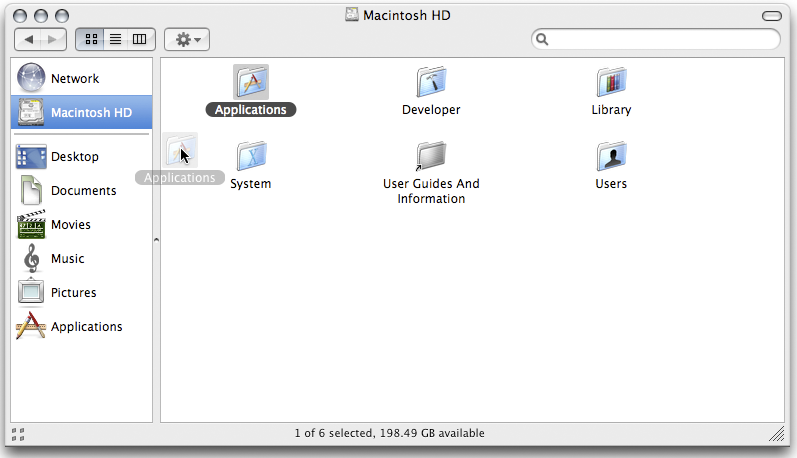
- Open a new Finder window.
- Click on “Macintosh HD” (or your hard drive if you've renamed it)
- Drag your Applications folder to the dock and release.
Important: You can't drag it from the sidebar of the finder widow.
Important: You can't place the Applications folder in the main portion of the dock. It must be placed next to the “Trash”